



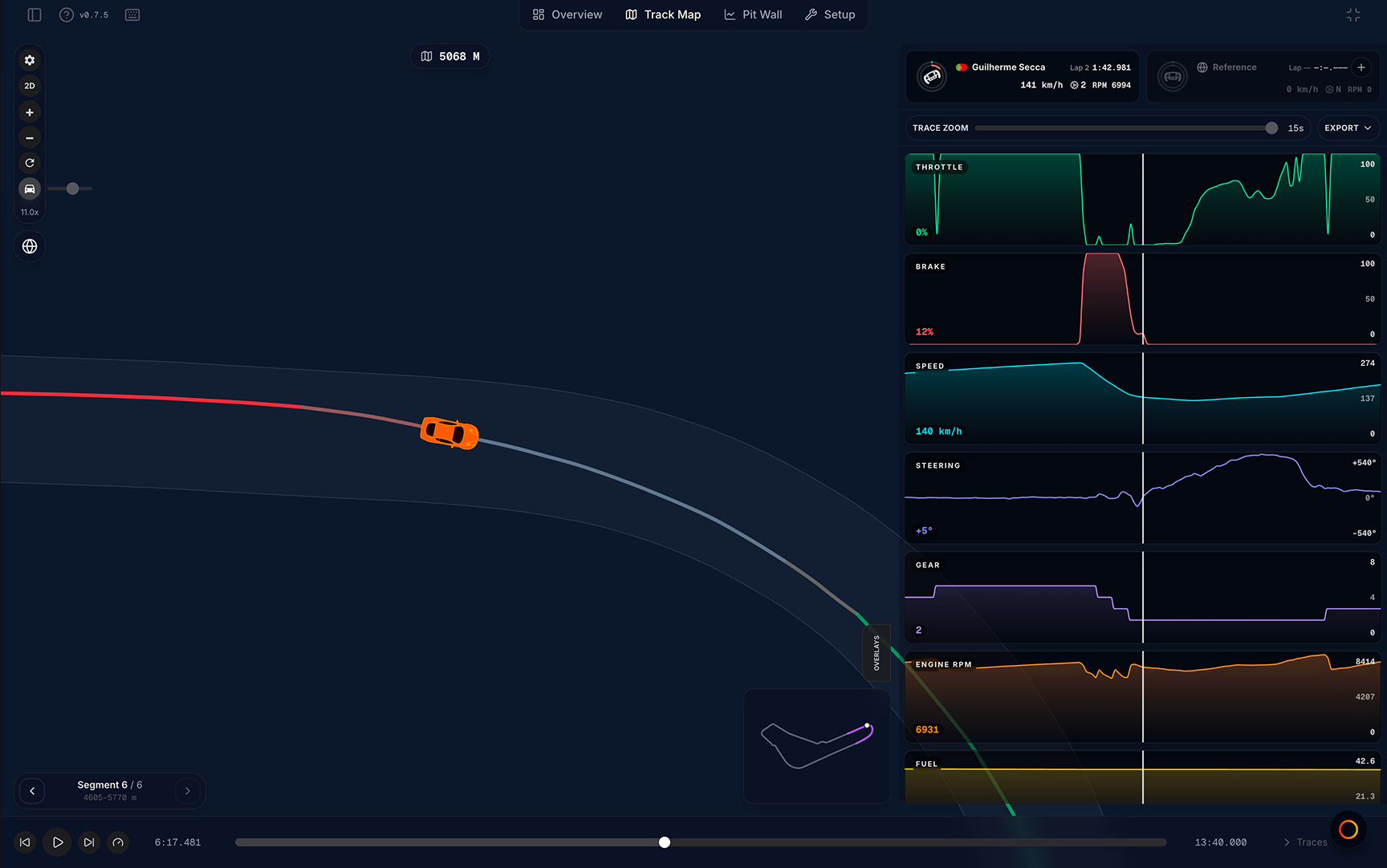
The Track Map tab is the default viewer tab and the core of MyLMU Telemetry analysis. It is built around replay: watch your lap on a map, compare against a reference ghost, and drill into corners with traces, overlays, and segment tools.
Open Track Map
Viewer tab bar → Track Map (first tab). Track Map opens automatically when you select a file unless you were on another tab in a previous session.
Layout
| Zone | What it shows |
|---|---|
| Center | 2D map or 3D replay |
| Top-left toolbar | Gear (Alignment Controls), 2D/3D toggle, zoom, Reset View, Follow car, Community Best Laps (globe) |
| Top-right | Segment mini map when traces are closed (desktop) |
| Right edge | Overlays tab — technical popups; Traces panel when open |
| Bottom-left stack | Sector comparison card and segment seeker — above the driver strip (desktop, when a reference is loaded) |
| Above replay bar | Driver strip — lap picker, reference ghost, live inputs |
| Bottom | Replay control bar — play, speed, prev/next lap, timeline |
When the Traces panel is open, the driver strip hides and the same lap picker, reference menu, and live driver cards appear at the top of the traces stack instead.
Two control layers
Track Map splits lap control across two bars — mixing them up is the most common confusion:
| Control | Where | What it does |
|---|---|---|
| Lap picker | Driver strip (or traces header when panel is open) | Jump to any lap in the session |
| Previous lap / Next lap | Replay control bar | Step one lap backward or forward |
| Timeline scrubber | Replay control bar | Seek within the current lap only |
| Play / Pause / Speed | Replay control bar (or keyboard) | Control replay timing |
Example: Use the driver strip to jump from Lap 3 to Lap 12, then use Previous lap on the replay bar to step back to Lap 11 — the bar never shows the full lap list.
Reference ghost (single compare)
Track Map compares your current lap against one reference at a time (best lap, picked lap, external ghost, or community ghost). Load it from the driver strip center pillar (Add reference) or the traces reference menu.
In 3D with Custom ghost mode, you can assign up to two ghost cars via the Laps overlay — see Overlays and modals.
Suggested workflows
Quick lap review
- Pick your target lap in the driver strip lap picker
- Press Space to play; scrub the timeline to a corner of interest
- Open Traces for throttle, brake, and speed charts
Compare against your best
- Load Best lap as reference from the driver strip
- Watch the delta in the driver strip center pillar (and Delta trace if Traces is open)
- Step corners with the segment seeker or click markers on the segment mini map
Compare against the community
- Open Community Best Laps from the driver strip (Community best) or the globe button in the top-left toolbar
- Click Load on a row
- Read sector comparison for S1/S2/S3 splits, then use comparison markers on 2D for brake and throttle timing
Deep corner diagnosis
- Pause replay at a problem corner
- Open Overlays → Tyres or Brake Data for live values
- Toggle Dist vs Time in the driver strip to see whether you are ahead on track or on the clock
vs Pit Wall
| Track Map | Pit Wall |
|---|---|
| Replay-first — play, pause, ghosts on the map | Analysis-first — charts, stints, derived metrics |
| Single reference ghost (two ghost cars in 3D Custom) | Base + Compare 1 + Compare 2 on the map |
| Traces panel for quick inputs | Inspector with subsystem presets and custom channels |
| Driver strip lap picker | Base / Compare pickers + stint scope on Laps |
| Sector labels and Sector Comparison card | S1 / S2 / S3 sector zoom buttons on the map |
| Segment seeker for corner steps | Distance brush on Inspector charts |
Use Track Map to watch and replay a lap; use Pit Wall to compare trends across many laps and stints.
Guides by topic
| Guide | Topic |
|---|---|
| 2D map | Top-down racing line |
| 3D replay | WebGL track and ghost cars |
| Playback and shortcuts | Keyboard reference |
| Replay control bar | Play, speed, timeline |
| Driver strip | Lap picker and reference |
| Traces panel | Channel charts |
| External ghost | Compare another Your files lap |
| Community ghost | Leaderboard reference laps |
| Sector comparison | S1/S2/S3 vs reference |
| Segment seeker | Corner-by-corner jumps |
| Segment mini map | Top-down segment overview |
| Comparison markers | Brake, min speed, throttle on 2D |
| Overlays and modals | Tyres, brakes, G-G, and more |
| Map display preferences | Line style and alignment |
| Fullscreen and cinema mode | Maximize and clean screenshots |
Quick reference
| Action | Key |
|---|---|
| Play / Pause | Space |
| Reset to lap start | R |
| Switch 2D / 3D | M |
| Toggle fullscreen | F |
| Cinema mode (3D only) | ⌘ + ⇧ + U (Mac) / Ctrl + Shift + U (Windows/Linux) |
| Toggle files sidebar | B |
Related
- Pit Wall — multi-lap analysis and sector zoom
- Telemetry leaderboard — where community ghosts come from
- Free vs Pro limits — community lap views and trace export